Raster versus vector graphics: the core difference
Raster graphics store a grid of pixels. A 480 × 480 image has a finite number of samples describing its colors. Enlarging it asks the software to fill more screen space from those samples; interpolation can smooth the result, but it cannot recover the original detail that was never captured.
Vector graphics describe shapes with geometry such as paths and curves. A renderer draws those shapes at the requested size. This makes a vector master useful for a shape-based logo that must serve both small digital placements and large production work. It does not mean that every detail will remain readable when the entire design becomes tiny.
| Question | Raster | Vector |
|---|---|---|
| How is the artwork represented? | A fixed grid of image pixels | Geometric shapes and drawing instructions |
| Typical use | Photographs, textures and finished pixel-sized graphics | Shape-based logos, icons and editable illustrations |
| What happens when enlarged? | The available pixels must cover a larger area | Paths can be rendered at the new size |
| Important exception | A correctly sized raster export can look sharp | A vector document can contain a fixed-resolution bitmap |
When should you use raster or vector?
Use raster for photographs and finished digital compositions
A photograph contains texture and continuous tonal detail that normally belongs in a raster format. A social graphic combining a photo, text and a logo can also be delivered as one raster image at the destination's required dimensions. Preserve the editable composition separately so later edits do not begin with a flattened preview.
PNG is a common option for a raster logo needing transparency. JPEG does not support a transparent background, so it is not interchangeable with a transparent PNG. Other formats may suit a website's delivery needs; check the publishing system's supported formats and inspect the uploaded result. MDN's image-format guide explains the relevant format capabilities.
Use a vector master for reusable shape-based artwork
Keep the approved geometry when the same mark needs many sizes. Export a raster copy when the destination requires one rather than tracing a previous PNG each time. A printer or fabricator may request a different delivery format from a website; ask for their requirements before preparing the production file.
SVG can contain paths, text and embedded images. A PDF can also hold a mixture of content. The filename therefore answers a different question from whether the logo itself consists of scalable shapes. Inspect the contents, not just the extension.
Three mistakes a larger file will not fix
- Using a screenshot as the master. A screen capture records a rendered view, potentially including a background or surrounding space. The screenshots in this article document the interface; they are not downloadable logo artwork.
- Changing resolution metadata alone. A higher pixels-per-inch setting cannot reconstruct missing detail. Specify the required dimensions and begin from the best source available.
- Distorting the proportions. More pixels will not fix a logo stretched to fit a slot. Preserve the aspect ratio or choose a different approved composition.
A worked example: one logo, three destinations
These are specified example dimensions, not a customer project or a product benchmark. Suppose your website displays a logo 240 CSS pixels wide. At a device pixel ratio of 2, a raster export needs 480 pixels across to supply one image pixel per device pixel at that size. A 240-pixel file has half that horizontal resolution. A 960-pixel file supplies more pixels, but does not automatically improve a 480-device-pixel display.
| Destination | Calculation | Decision |
|---|---|---|
| 240 CSS-pixel header, DPR 2 | 240 × 2 = 480 pixels | Export at least 480 px wide, or use supported vector artwork. |
| 1,200-pixel social graphic | Render at the final composition size | Place the vector master before exporting the complete graphic. |
| 50 mm printed mark at a requested 300 pixels/inch | 50 ÷ 25.4 × 300 ≈ 591 pixels | Use about 591 px across for that raster specification; confirm requirements with the printer. |
The print example assumes the printer specifically requests 300 pixels per inch at final size. It is not a universal requirement for every sign, printing method or viewing distance. Bleed, color handling and fine detail are separate checks. Increasing a resolution metadata setting does not reconstruct missing edge detail.
A real download screen: what it does and does not tell you
We opened Digital assets → Logo Files for our fictional Morrow Studio test brand in Ficonica on 25 September 2026. The page listed Primary Logo, White Background, Default Transparent, Black on Transparent, White on Transparent and Icon Only. The cards displayed Unlock in this session. We did not complete a paid download or inspect an exported Ficonica file.
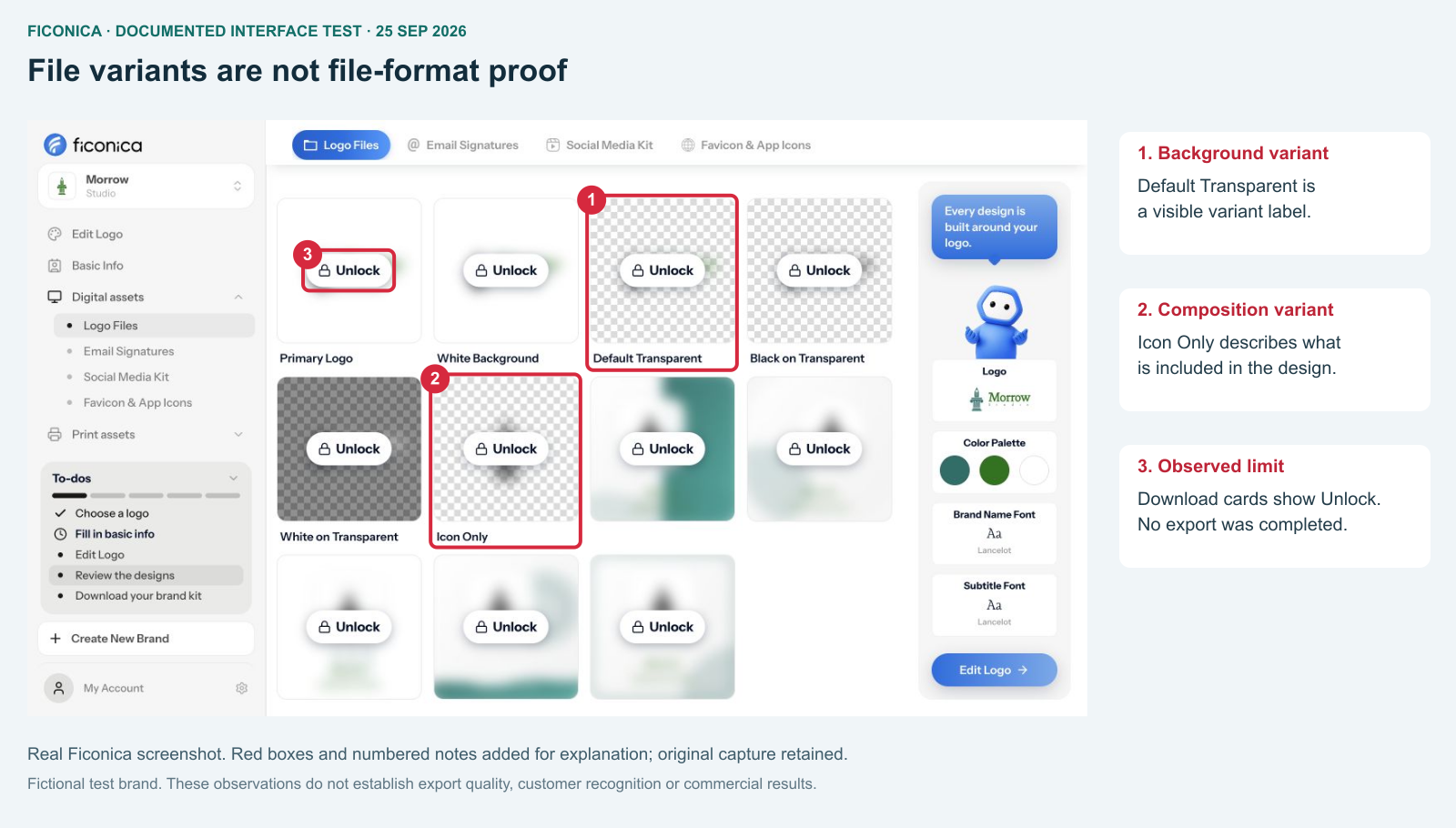
- “Default Transparent” names a background variant; it does not identify the file format.
- “Icon Only” names a composition variant; it does not prove that its contents are vector paths.
- Unlock was visible. No downloaded SVG or PNG was examined.
This distinction matters when ordering a logo package. Transparent, horizontal and icon only describe different properties from PNG, SVG and pixel dimensions. Ask for those properties separately. A transparent file can still be a small bitmap; a vector file can still contain the wrong composition.
Ficonica is our own product. We include the observed access limit because an editor preview is not evidence that a particular file can be downloaded for free or that the exported artwork has been checked.
Inspect what is inside the file
Open the master in a vector editor and select a shape. Editable paths are different from a single placed photograph. In an SVG, an image element may reference or embed a bitmap; that bitmap still has fixed dimensions. A file can mix paths, text and bitmaps. Keep editable text when useful, but check font availability when sharing it.
MDN explains SVG's vector-based representation; its image-format guide describes the roles of common web formats. Neither implies that every SVG is a clean vector logo.
Package files by use, not by quantity
Keep the editable master, a tested website version and a transparent raster fallback. Add a light-on-dark version if your design needs one. Name each export with its purpose and dimensions: logo-header-dark-480w.png is easier to use than final-final2.png. Reopen the exported file and place it at the intended size before handing it over.
A three-question handoff check
- What is the destination? Record the displayed width, background and any required crop.
- What is in the file? Check whether the mark is paths, text, a bitmap or a combination. Do not judge from the extension alone.
- What have you actually verified? Reopen the delivered file in the destination application. A preview, a download and an inspected export are three different milestones.
A vector logo is not a complete print-ready layout
Scalable artwork solves only part of a production brief. A complete label or business card may still need margins, bleed, appropriate color handling and reliable font output. Embedded raster elements need checking at their final size. Ask the production partner to confirm the setup and request a proof where an error would be costly. Do not infer that a file is production-ready merely because it opens successfully.
What files does a logo need? covers the wider delivery package. Logo files for printing covers print-specific choices.